A hobbyist’s build guide: a private, always-on, voice-first agent on one Linux box, reached from your phone like any other app

Build a true portable AI Assistant in a weekend or two — fully sovereign and private — Image from futuretweets.com
Sep 20, 2026 · Madkat Omega
Why this build is worth it
The consumer AI assistant grew hands this year. Meta’s Muse landed on the Mac on September 17 and now works inside Finder, Mail, Calendar and Notes, wired into email, payments, health, smart home, shopping and music. Google’s Gemini Spark runs around the clock on cloud VMs. Instinct answers your text messages and books your dinner. They are genuinely good, and they proved something important: an agent that lives in your day and acts on your behalf is a category people want.
Everything that makes those products feel magical is now available to you as open weights and open protocols. A 27-billion-parameter model under Apache 2.0 sits within a few points of the frontier and fits on a single consumer card. The Model Context Protocol that Spark uses to reach Canva and OpenTable is the same protocol your own tools will speak. Speech recognition that beats Whisper runs in 600 million parameters. The pieces are on the table.
What you add by assembling them yourself is the part no subscription includes:
- The weights are yours. No deprecation notice, no silently updated checkpoint, no prompt that worked in March and breaks in April. What you pin is what runs, for as long as you want it to run.
- The index is a file on your disk. Eight months of your documents, decisions and working context, distilled into something genuinely useful — and readable only by you.
- No dependency on anyone else’s uptime. The intelligence, the index and the tools all live on your network, so nothing you rely on can be rate-limited, deprecated or taken offline for maintenance by a third party. When your internet drops, only the web-fetch tools pause; conversation, memory and every local tool keep working on your own network.
- Privacy as a property, not a promise. Not a policy page, not a data-processing agreement. A packet capture shows nothing leaving, and you can run that capture yourself.
This guide is the build. It assumes you are comfortable with Linux, containers and reading a stack trace, and it goes deep enough that you can research each component and assemble it yourself. Work through it in order and you finish with an assistant you talk to from your phone, that remembers what you were doing last month, that can go off and run a ten-minute job and report back — and that answers only to you.
Coming from the weekend build
If you followed Build Your Own Assistant, and Keep It, you already have most of this working on your laptop, and every piece carries over. This guide is that build moved onto its own hardware, with the two things a laptop could not give it: a hardware budget large enough to keep everything resident, and a voice interface you can use from anywhere.
The foundations are the same. Memory is still the budget that decides everything, and the engine you installed still runs the models — it just runs them as a service on a machine that never sleeps. Your tools still speak MCP, starting with the same three. Your document index, embedding model and meeting pipeline come across as they are, so the assistant keeps everything it already knows about your work. The four rules you wrote down stay word for word, and so does the habit of running generated code in a throwaway sandbox.
What changes is room and reach. With its own box, the assistant no longer has to juggle a small model against a big one to spare your battery — everything stays loaded, all the time, and your laptop goes back to being yours. Talking to it grows from holding a key and waiting for a reply into a real conversation you can interrupt mid-sentence. Memory gets sharper, learning the durable facts from each exchange rather than just storing them. It can take on longer jobs in the background and tell you when they are done. And instead of living on one laptop, it answers from your phone, your desk, or anywhere you carry a connection back to it.
1. What you are building
A dedicated box that runs the assistant and nothing else. That shift is about more than headroom: it turns a resident agent into an appliance. A resident agent shares your machine and has to be managed around your work. An appliance lives on its own hardware, runs continuously, and can be wiped and rebuilt from a configuration repository — the way you already treat a router or a NAS.
It also moves the line between listening and not listening off a settings screen and into the physical world. The box has no screen, keyboard, microphone or speaker. It hears nothing unless you open a client and point it at the box, and the microphone in use is always the one on the device in your hand.
How you control it
The client is one screen, and the mode is always the gesture you are making — nothing to hunt for in settings.
- Type any time. The client opens to a chat, like any AI app, and text works whatever else is happening.
- Hold to talk. Press and hold the talk button, say what you want, release to send. The microphone is live only while your thumb is down — the weekend build’s hold-to-talk key, moved to your phone. There is a screen edge animation while the audio is being transmitted.
- Tap talk to open the line. One tap and the microphone stays live, hands free, for back-and-forth conversation. With no wake word, the addressee classifier decides whether you are talking to it, and it is tuned to err toward silence: when it is unsure, it says nothing and shows a quiet “for me?” chip you can tap to get the answer. Tap again to close the line. Again there is a visual edge animation while the audio is being transmitted.
- Tap record for meetings and memos. Recording is its own mode. It captures everyone in the room, and the assistant never speaks, never interrupts and never fires a tool, so nothing anyone says can be mistaken for a command. Need it mid-meeting? Hold to talk: your question goes in, the answer comes back as text on your screen, and the recording never stops. Stop recording and the whole thing goes to the model as one piece — transcript with speakers, summary and action items, filed into your notes. Here we have a recording button that is red while recording and grey when not. No edge animation as this is a different non-interactive mode that exists in the background without disrupting the push and hold to talk or chat window.
- Close the app and it disconnects. The session ends, the appliance carries on with indexing, consolidation and any background jobs, and nothing on the box is listening, because nothing is connected. You may task switch and switch back and the app should be able to handle this seamlessly without interrupting recording.
The client always shows which of these you are in, alongside what is running and what it has heard recently, so “is it listening?” takes one glance to answer. When the app is closed and a job finishes or a confirmation is waiting, the app’s own push notification tells you, and tapping it opens straight to the result.
2. The machine
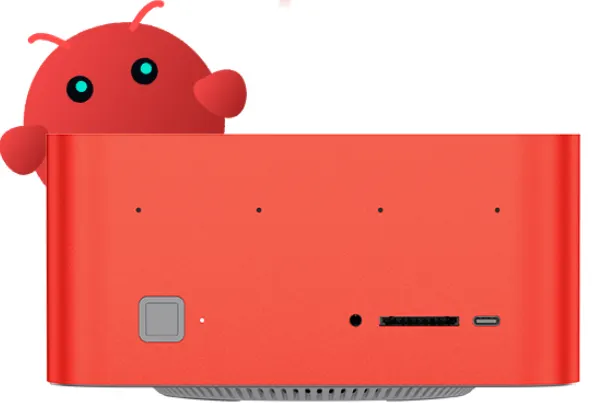
The pick is a Beelink GTR9 Pro with the Ryzen AI Max+ 395 and 128 GB of memory. Strix Halo is the best value for this build because of one number: it lets the graphics chip use about 96 GB of the machine’s memory — more than any consumer graphics card — which is enough to keep every model the assistant needs loaded at the same time. The GTR9 Pro earns the nod over its Strix Halo siblings with a vapor-chamber cooler that stays quiet under sustained load and dual 10 GbE networking, exactly the traits you want in a box that never turns off. The 128 GB / 2 TB model lists at $4,349 on Beelink’s store as of September 2026; memory prices have moved a lot this year, so check the current listing.
Capacity matters more than raw speed here because a model takes 20–40 seconds to load from cold, and a conversation cannot wait for that. The mixture-of-experts models this build relies on only touch a fraction of their weights for each word, which suits this chip well: about 100 tokens per second for the everyday model and around 55 for a 120-billion-parameter one. The weekend build’s floor of 15 words per second is right for reading; for voice, aim for 40 or more.
Setting it up comes down to four things:
- Give the graphics chip its memory. In the firmware settings, allocate about 96 GB to the GPU, then confirm after boot that it sees the full amount.
- Install Ubuntu and AMD’s open-source Vulkan driver. It is the fastest and most stable path on this chip, and a headless Linux box runs 20–30% faster than the same hardware under Windows.
- Serve models through AMD’s Lemonade. It runs generation on the GPU and hands prompt processing to the built-in NPU where the model supports it, roughly halving the wait for the first word. That is the NPU’s one job in this stack, and a useful one — speech, retrieval and tools all run comfortably on the GPU and CPU.
- Check the model is on the GPU. After any driver update, glance at your server’s status. A model quietly running on the CPU is the most common reason a build suddenly feels slow.
Keep it running through the bumps. Add a consumer UPS in the 1,000–1,500 VA range. At this box’s typical draw it rides through a brownout or an outage of 30 minutes or more without anyone noticing, and a longer one ends in a clean shutdown instead of a corrupted index. Over a year, that is the difference between an appliance that is simply always there and one you occasionally have to rescue. The GTR9 Pro ships with 2 TB of storage, which covers the models, the index and years of transcripts, so the UPS completes the bill of materials.
Plan for the bad day. Drives die and boxes get dropped, so make rebuilding boring. Only three things are irreplaceable: the configuration repository (compose files, unit files, prompts and the pinned model digests), the index with its embedding-model pin file, and the memory store. The models re-download from their pinned digests, and your notes and repositories already live elsewhere. Back those three up nightly with restic, encrypted, to a USB drive plugged into the box, and push a second encrypted copy offsite — a drive at a friend’s place or any object store, which only ever sees ciphertext. Recovery is then a checklist: install Ubuntu on the new or wiped box, clone the configuration repository, run your setup, pull the models by digest, restore the latest snapshot, sign the agent’s browser profile back into its accounts, and re-enroll your phone on the mesh. Rehearse it once before you need it. With the models already downloaded it takes under an hour, and the assistant wakes up remembering everything it knew.
Built to adapt. The design is intentionally portable. Every part of the stack talks through standard interfaces — an OpenAI-compatible endpoint for models, MCP for tools, WebRTC for audio — so the same recipe runs on other AI-ready platforms, including a 128 GB Mac Studio and NVIDIA’s DGX Spark. Only the inference backend underneath changes; everything you build on top carries over.
3. The model lineup
Instead of one large model, run a fast model and a stronger one, with a simple router between them. It’s the same trick the big hosted agents use, and it’s what makes a sub-second voice loop possible on one box.
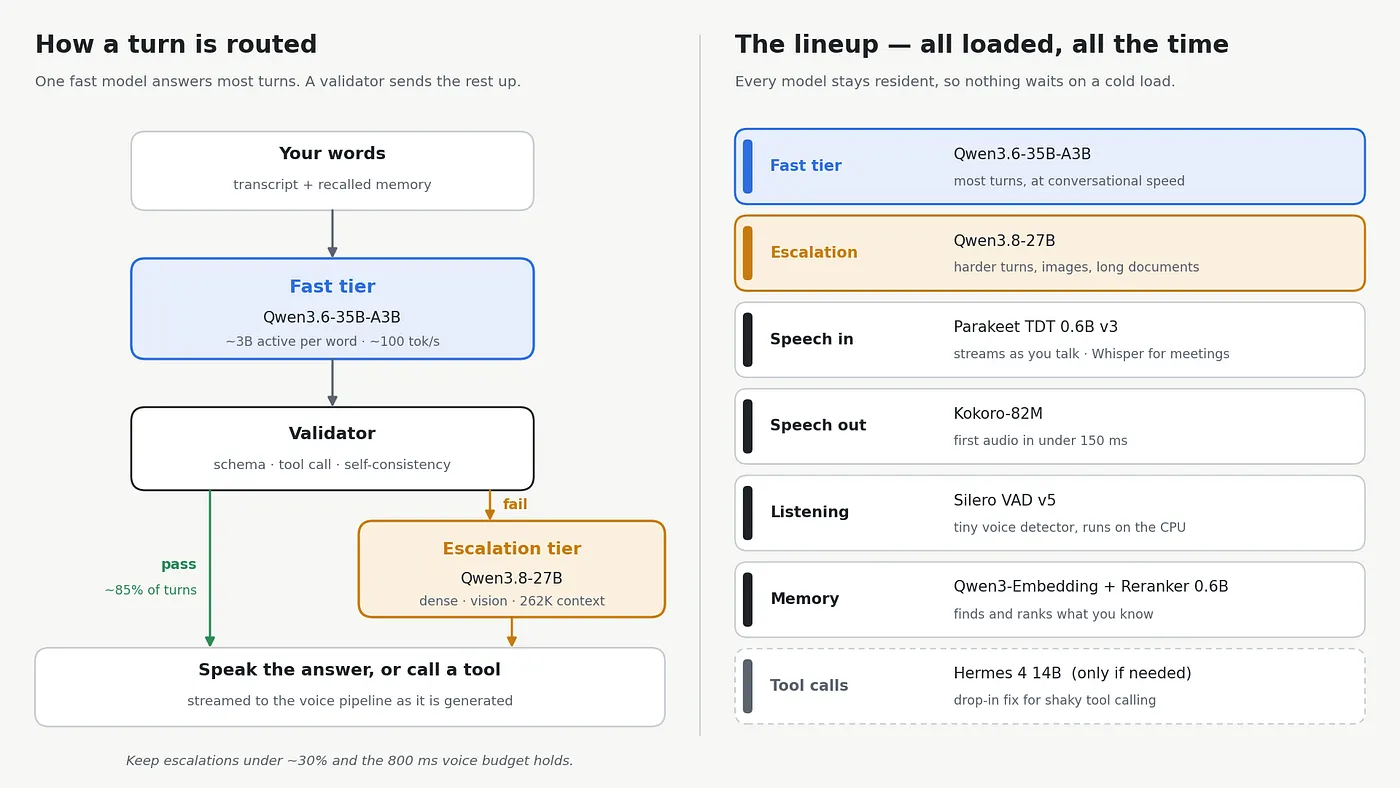
The router. Every turn goes to the fast tier first. Before its answer is spoken, a small validator checks three things: that any tool call matches the tool’s schema, that the arguments are valid, and that the answer is consistent with itself. If all three pass, the answer goes straight out. If any fail, the turn is sent to the escalation tier and answered there. Log how often that happens. Keep it under about 30% and the voice budget in the next section holds comfortably; if it climbs higher, tighten the fast tier’s prompt or trim the tools it can see before reaching for a bigger model.
The two tiers. The fast tier is Qwen3.6–35B-A3B, the weekend build’s best all-round pick. It’s a mixture-of-experts model that uses only about 3B parameters per word, so it answers most turns at around 100 tokens per second. The escalation tier is Qwen3.8–27B: dense, Apache 2.0, reads images, and holds long documents.
Everything around them stays loaded too: Parakeet for speech in, Kokoro for speech out, Silero for spotting when you start talking, and the Qwen3 embedding and reranking models for memory. If your fast tier ever struggles with tool calls, fix the prompt format first; if the model itself turns out to be the problem, Hermes 4 14B is a drop-in replacement trained for exactly that job.
Whichever models you choose, pin the exact versions — weights, template, and server — and treat any change as a new setup to re-test. That’s what keeps the assistant behaving the same next year as it does today.
4. The latency target
Aim for under 800 ms from the end of your sentence to the first sound back, with 500 ms as the point where it starts to feel like a conversation. It’s the same target as the weekend build; the difference is that the audio now crosses your network to a separate box, and on this hardware it fits comfortably.
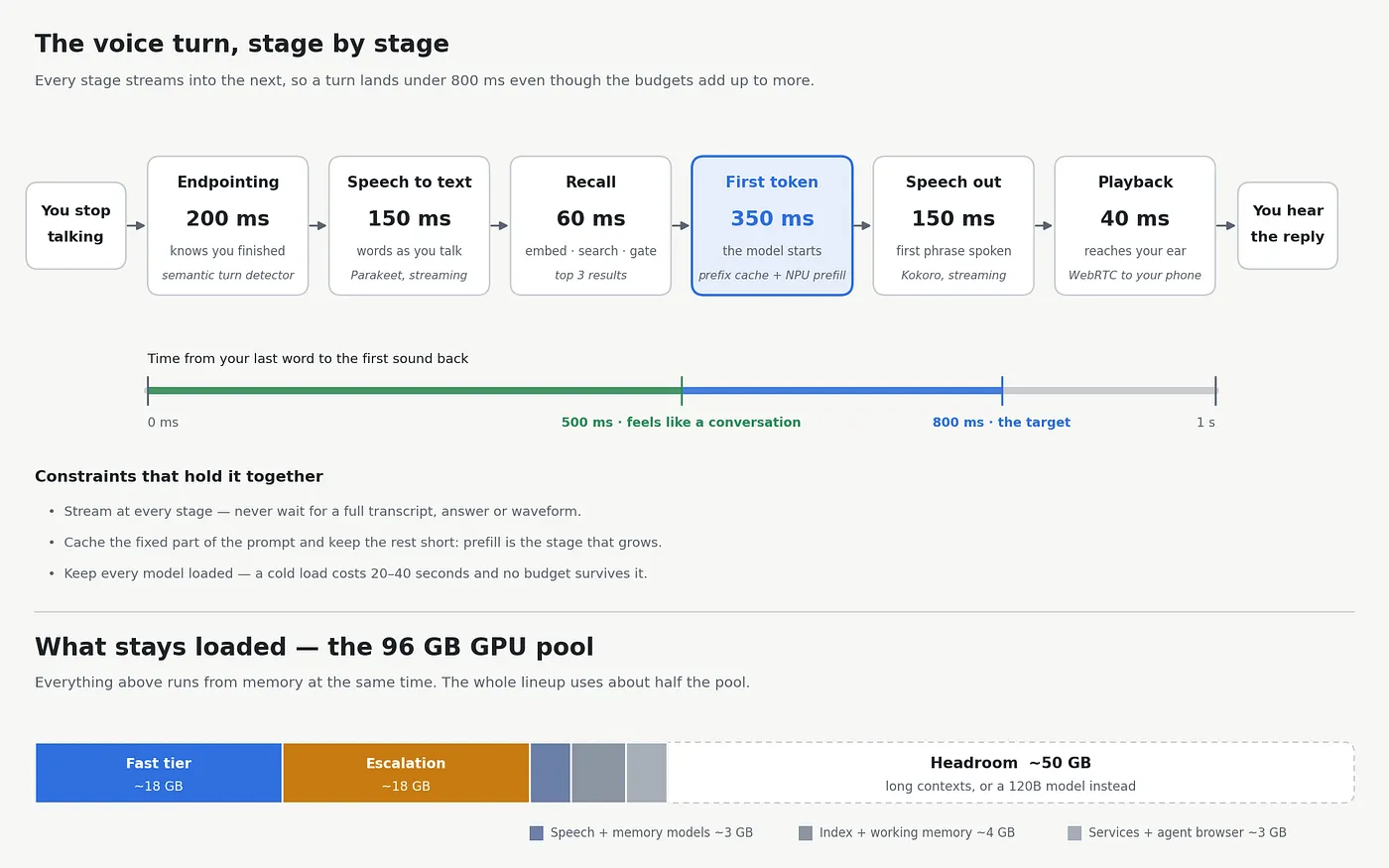
Why it fits. Each stage hands its output to the next as soon as it has any, so the stages overlap instead of queuing. That’s how a turn lands under 800 ms even though the individual budgets add up to more. The one stage that grows with what you feed it is the first token: the model has to read the whole prompt before it can answer. Three moves keep that stage short. Cache the fixed part of the prompt (instructions and tool descriptions) so it’s read once rather than every turn. Show the model only the tools that matter for the moment. And let Lemonade hand prompt reading to the NPU while the GPU generates.
Why residency matters. No voice budget survives a cold load, so everything in the lineup stays in memory all the time. Together they use roughly half of the 96 GB pool, which leaves room for long conversations, a bigger escalation model, or both. Switch off any idle-unload timer in your inference server, and the first question after lunch will answer as quickly as the last one before it.
5. The voice loop
Once you tap to open the line, the microphone stays live until you close it. That one decision is what turns the weekend build’s hold-to-talk exchange into something you can actually talk with, and everything below follows from it. Hold-to-talk stays one gesture away for a noisy room.
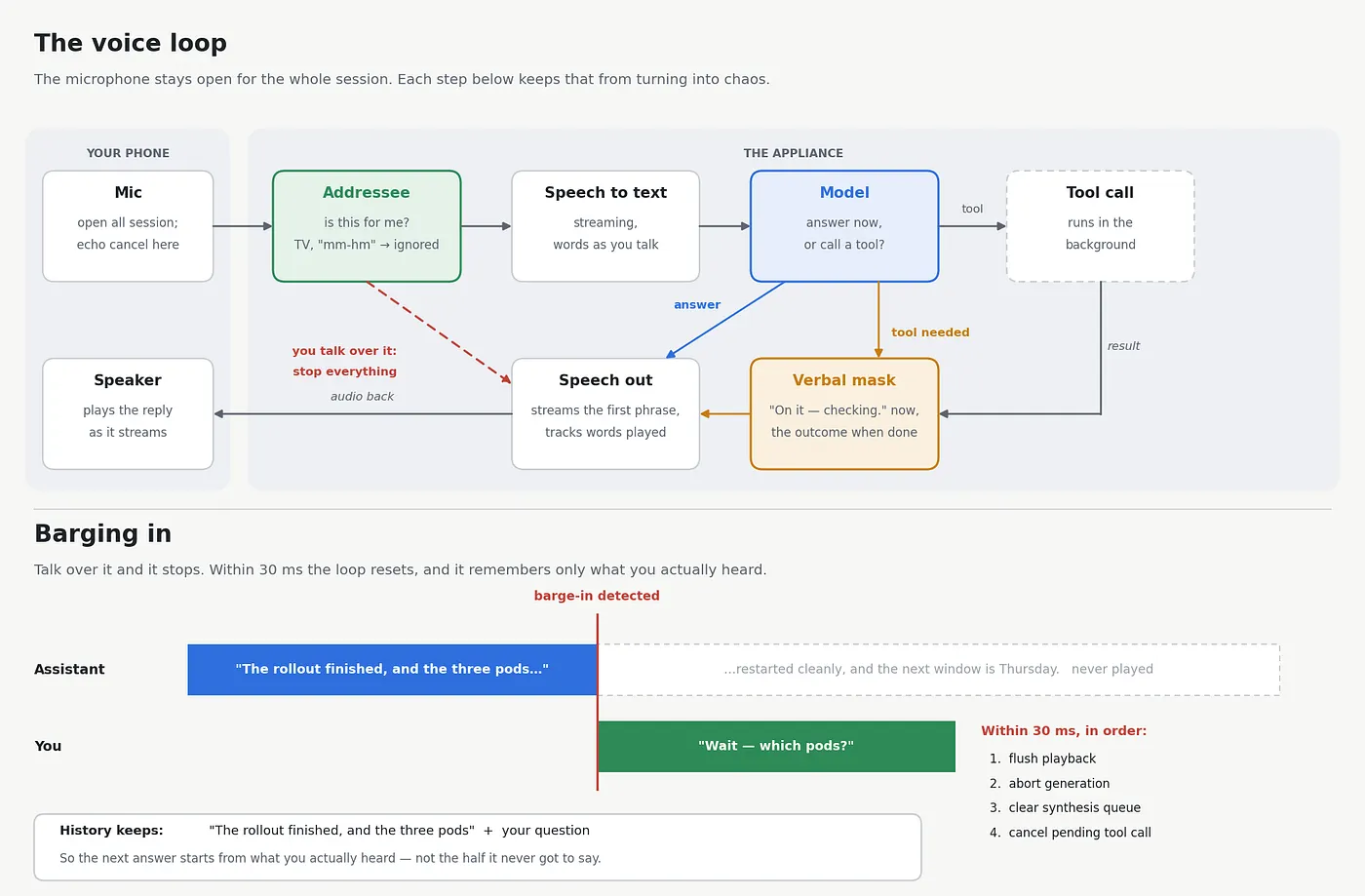
Barge-in. Interrupt mid-sentence and it stops. On a verified interruption, within 30 ms and in this order: flush the playback buffer, abort generation, clear the synthesis queue, and cancel any in-flight tool call that has not yet committed a side effect. When you pick an inference server, check that it exposes mid-stream cancellation — that single capability is what makes the rest of this possible.
Spoken-word truncation. This is the detail that makes people say it feels real. Track which words were physically played at the moment of the cut, and commit only those to the conversation history. The model then knows exactly where you stopped it, and every following turn is built on what actually happened in the room.
Addressee detection. Layer a device-directed-speech classifier above the raw VAD so the assistant answers you and ignores the podcast, the phone call and the person in the next chair. With no wake word, it reads the cues people already use: speech aimed at the device, phrasing that asks for something, and the flow of your conversation with it. Tune it to err toward silence — a missed reply costs you one tap on the “for me?” chip, and a wrong one costs trust. This is what lets you leave the line open while you work, and when you need guaranteed silence, record mode switches replies off entirely.
Echo cancellation on the client. WebRTC gives it to you free at the capture point, which is the only place it works properly. Route even your desk audio through WebRTC and the assistant hears you clearly while it is speaking, with or without a headset.
Verbal masking. When a tool call dispatches, fork the pipeline: speak a short acknowledgment immediately while the call runs in the background. Pre-synthesize the fixed phrases and map them per tool in the orchestrator, and the acknowledgment lands within about 30 ms of you finishing — so the two or three seconds a tool takes become natural conversational pacing instead of silence.
Close with the outcome. “Saved to today’s note — the rollout finished with no restart errors” is the payoff. Feed the tool’s return value back into the final generation and ask for one punchy sentence carrying the key finding, so you never have to open a screen to confirm what happened.
Orchestration. LiveKit Agents and Pipecat both handle WebRTC transport, VAD triggering and the cancellation chain, and both accept local endpoints for speech-to-text, the model and text-to-speech. Pipecat exposes the pipeline more explicitly, which is handy if you want to shape the cancellation path yourself. Pair either with a local turn detector and your own addressee classifier and the whole loop stays on your hardware.
6. Memory that persists
This is the part that makes your assistant better than a hosted one within a couple of months, because it accumulates context that nobody else has.
Memory is a retrieval layer sitting beside a deliberately small context window. Keeping the active prompt tight is what keeps answers fast and accurate: you pay prefill only for what matters, the KV cache stays small, and the model reasons over a handful of relevant facts instead of hunting through a transcript.
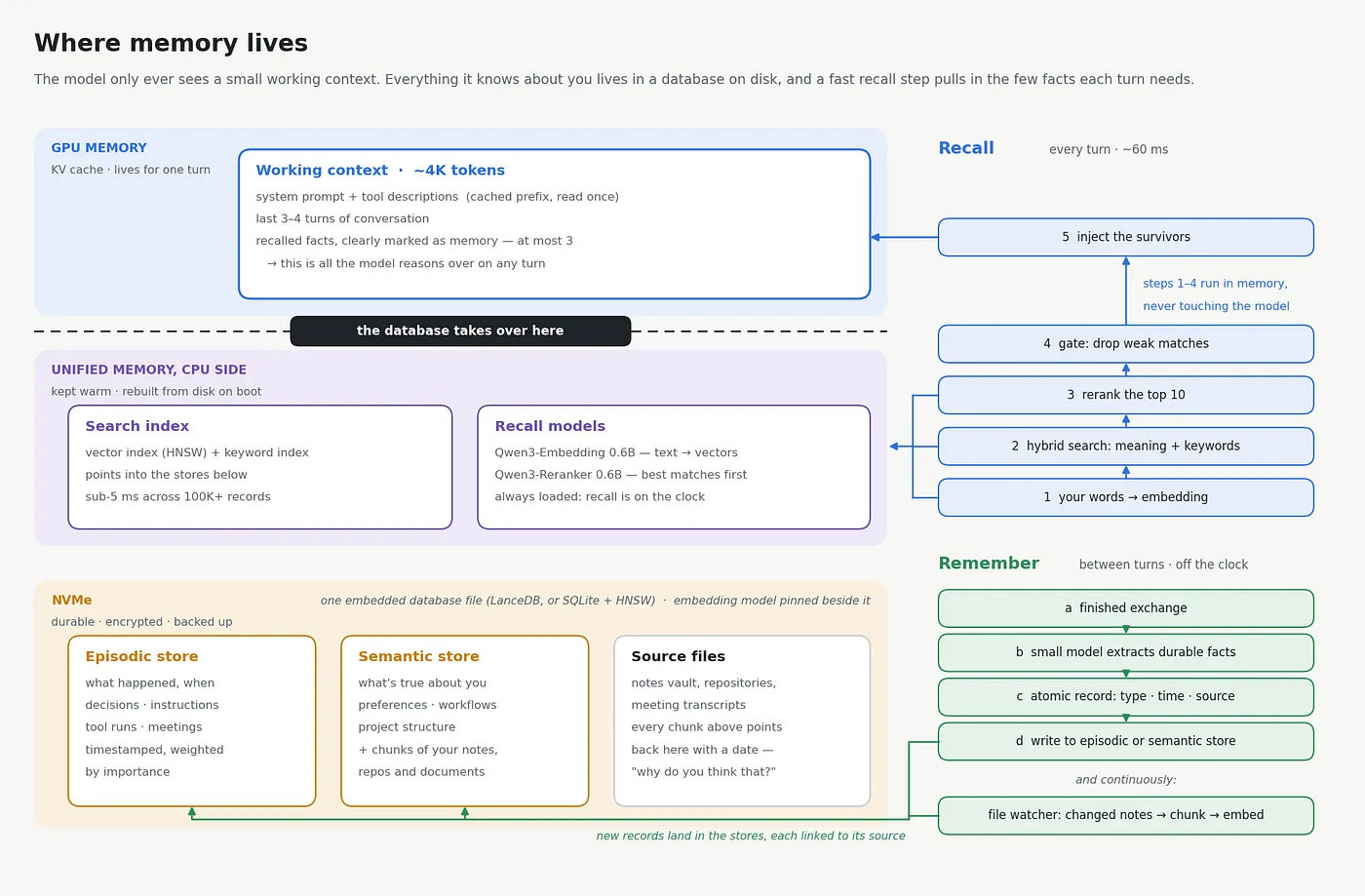
Three tiers:
- Working context — system prompt, tool catalog, the last three or four turns, and the retrieved blocks. Around 4K tokens.
- Episodic store — atomic events tied to time: decisions made, instructions given, tools invoked, what happened when. Grows a few megabytes a month.
- Semantic store — timeless facts: preferences, workflows, project structure, plus the indexed contents of your notes vault, repositories and documents.
The retrieval loop. Embed the utterance, run hybrid retrieval — dense vectors plus lexical matching — then rerank with the cross-encoder and gate on distance, keeping only results above your confidence threshold. Hybrid matters because a personal corpus is full of identifiers, filenames, part numbers and project names that lexical search nails and embeddings blur. Distance gating matters because a vector store always returns its nearest neighbor; gating is what lets the assistant simply not bring up a memory when none is relevant. Inject what survives in a clearly delimited block so the model can tell recalled context from instruction.
Consolidation. Rather than storing raw turns, run a background pass over each finished exchange asking a small model whether it contained a durable fact, decision, preference or instruction, and write atomic records with category, timestamp, source and an importance score. Your box is idle twenty-odd hours a day — that is free capacity, and it is what turns a pile of conversations into something with structure. Give yourself commands to list, correct and delete any record, so what it remembers is always your call.
Continuous indexing. Watch your notes vault, chosen repositories and the transcript directory, and embed incrementally as files change. Keep source attribution on every chunk so you can always ask “why do you think that?” and get a file and a date back.
Meetings. The weekend build’s meeting pipeline moves across unchanged: capture, transcribe, summarize with action items, write into your notes directory, and let the watcher index it. On the appliance, tap record on whichever device is in the room. Whisper handles the transcript and WhisperX separates the speakers, so you know who agreed to what. Because record mode never replies, a question you ask mid-meeting with hold-to-talk comes back as text and the recording runs on uninterrupted. Your assistant remembers your meetings exactly as before — from whatever device was in the room.
The store itself. Keep the one you already have. LanceDB from the weekend build is exactly the right shape — in-process, on disk, no server to run — and so is SQLite metadata with an HNSW index. Qdrant is the step up if you want rich metadata filtering, such as restricting a search to one client’s folder or a date range. For one user, embedded wins: sub-5 ms search across hundreds of thousands of records, no container, no network hop.
Write the embedding model, its version, dimension count and chunking parameters into a file next to the index. If you are moving an existing index onto the appliance, bring the source documents and the embedding model together and it comes across intact. Pinning those is what lets the index keep compounding in value year after year.
7. Giving it hands
Tools reach the world through the Model Context Protocol — stdio for local servers, localhost HTTP for the browser bridge. MCP is the same standard the hosted agents use to reach third-party apps, which means the ecosystem you are plugging into is the industry’s, not a private one. Your agent calls typed functions with validated arguments and gets structured data back.
Local MCP servers turn anything on the box into a tool. Start where the weekend build started: three servers and no more — filesystem scoped to exactly one directory, a database in read-only mode, and fetch once the rules at the end of this section are in place. Grow from there into your notes vault, a media controller, a home-automation API, a shell wrapper. Ready-made servers cover filesystem, git, databases and common apps, and a custom one is a few dozen lines against the official SDK. Register each declaratively in the tool catalog with an explicit scope. If Goose was your client on the laptop, point it at the appliance’s endpoint and keep using it for text work at your desk.
Your own page tools extend it onto any web app. Inject a small script that calls the app’s own authenticated frontend API and returns clean JSON, then expose that as a named, typed tool. This is how a self-hosted Proxmox dashboard, a niche project tracker or a homelab console becomes first-class — and it is more durable than DOM scraping, because it survives redesigns and returns structured data you can reason about.
WebMCP is where this is heading. The W3C Web Machine Learning Community Group published the Web Model Context API on February 10, 2026, letting a page register typed tools an attached agent can discover and call. Chrome has run an origin trial, Edge has it behind a flag, and a polyfill and MCP bridge exist under MIT license. Feature-detect it, prefer a native page tool where a site offers one, and keep your own script as the reliable path.
The agent’s own identity
The agent reaches the outside world through a browser profile that lives on the appliance, running headful under a virtual display with an extension bridging it to the MCP hub. You sign that profile into the accounts the assistant should touch, once, and it keeps those sessions warm — so no credential storage in your code, no headless-browser blocking, no CAPTCHA or MFA prompt mid-task.
Giving the agent its own identity rather than borrowing yours is the move that makes this comfortable. Its authority becomes enumerable: you can write down on one page exactly what it can reach, and that list changes only when you decide it does.
The boundary
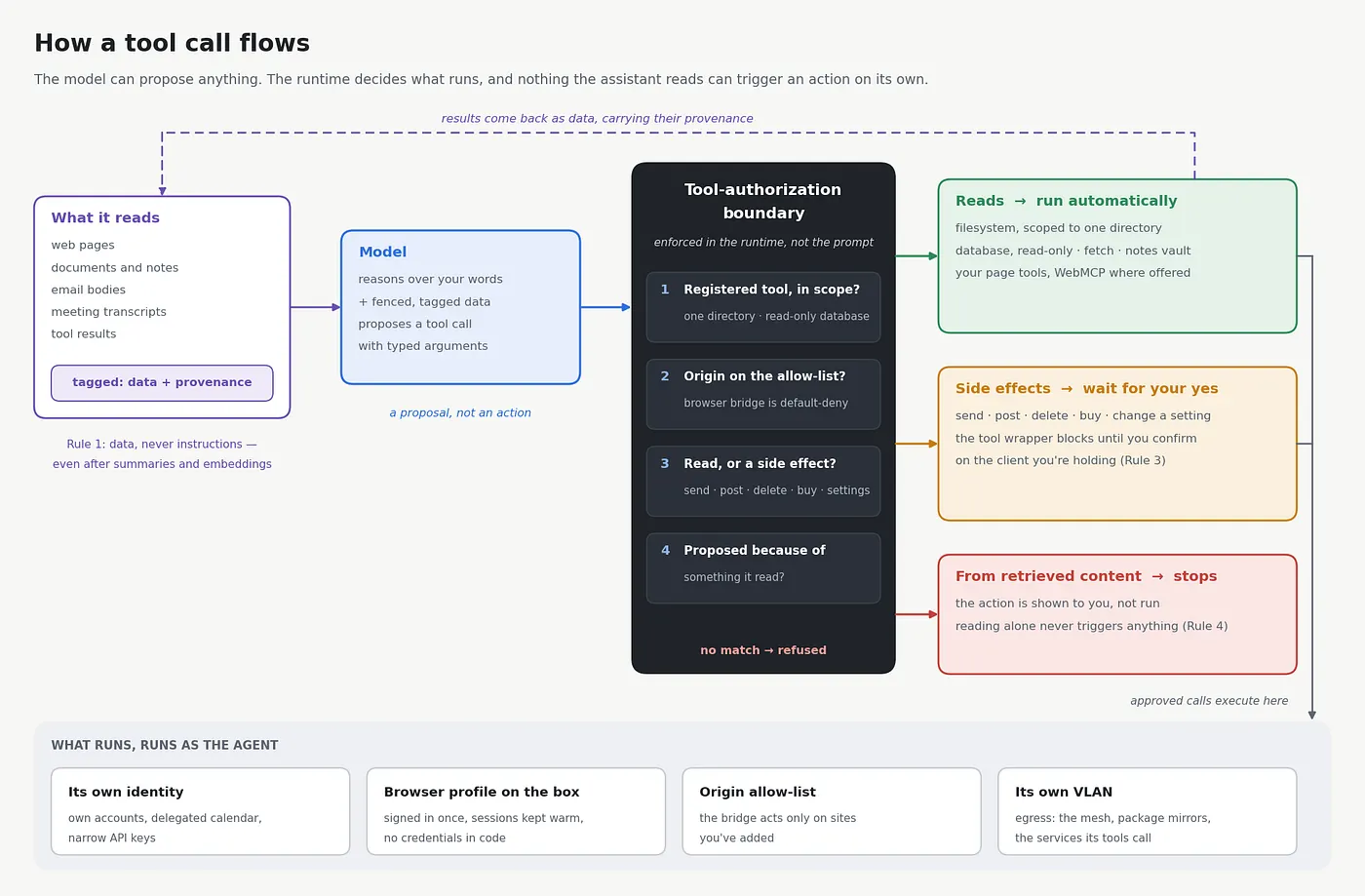
The weekend build’s four rules come across intact, and the appliance adds three controls of its own. Together they are the whole boundary, and on a box holding live sessions every line carries weight:
- Content it reads is data, never instructions. Web pages, documents, email bodies, transcripts — for the life of everything derived from them, including after summarization and embedding. Each carries its provenance.
- Scope the filesystem to one directory, enforced by the tool server’s configuration.
- Keep write tools on manual approval, permanently. Reads can be automatic. Anything that sends, posts, deletes, purchases or changes a setting waits for your yes, which arrives on whatever device you are holding. The gate lives in the tool wrapper, so the model has no path around it.
- No side effect can be triggered by something it merely read. An action proposed because of retrieved content stops and shows you.
- Give it its own accounts or scoped credentials wherever the service supports it — a delegated calendar, a shared drive folder, a narrow API key, a secondary mail identity. This is the highest-leverage fifteen minutes in the whole build.
- Allow-list the origins the browser bridge may act on. Default-deny, and add sites as you want them.
- Put the appliance on its own VLAN, with egress rules covering the mesh, your package mirrors and the specific services its tools call.
Enforce all seven at the tool-authorization boundary and the network edge rather than in prompt wording, and your agent can read the open web all day without that reading ever becoming an instruction.
8. Long-running jobs
Once the basics work you will want to hand it real work — investigate the failing container logs, clone the repo and find the commit that broke the tests, research something properly and write it up. A genuine plan-act-observe-correct loop takes anywhere from fifteen seconds to several minutes, which is a different time constant from conversation.
This stays true to the weekend build’s position on autonomy. Nothing here drives a screen or clicks a button. It is delegation: a bounded job, inside a sandbox, working through typed tools, checking with you before anything with a side effect, and reporting back. The well-briefed colleague still never leaves the office — you can just hand them a task and go get coffee.
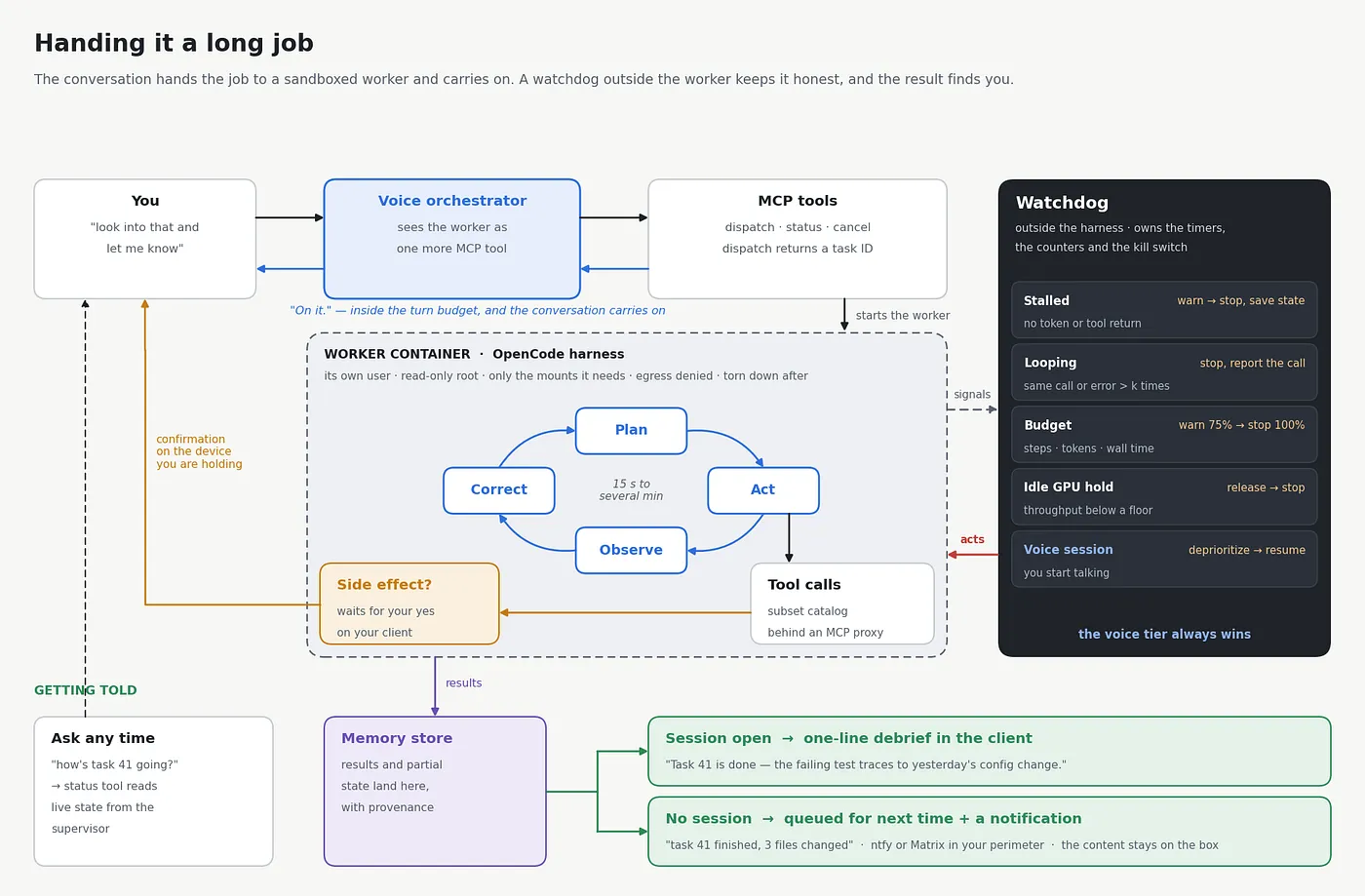
Delegate it. The autonomous harness becomes a background worker, and the voice orchestrator sees it as one more MCP tool: dispatch returns a task ID inside the turn budget, the worker runs in its own container, and results land in the memory store. You say “look into that and let me know,” the assistant says “on it,” and the conversation carries on.
Pick a harness. OpenCode is the clean default — MIT, terminal-native, 75+ providers, works against any OpenAI-compatible endpoint, runs air-gapped, and does one job in a directory you name. Nous Research’s Hermes Agent is a strong alternative with persistent memory and sandboxed execution over Unix-socket RPC; if you use it, review its generated skills so your capability list stays something you can enumerate.
Give the worker its own boundary — the weekend build’s sandbox rule, sized for longer jobs. A container created for the task and torn down after, its own user, a read-only root filesystem with only the directories it needs mounted, outbound network denied by default and allow-listed at the VLAN rather than in the harness config, and a tool catalog that is a strict subset of the assistant’s. Irreversible actions stay on manual approval and the confirmation comes to you on a client. An MCP proxy in front of its tool calls, validating parameters and scanning responses, is a good addition once the basics work.
Run the watchdog outside the harness, so the supervisor owns the timers, the counters and the kill switch. It watches for five signals — a stall, a loop, a spent budget, a GPU held while idle, and you starting to talk — and each has an automatic response, from a warning up to a clean stop that saves partial state and reports the repeated call verbatim, which is usually the whole diagnosis.
That last signal is the one that keeps everything feeling fast: the voice tier always wins. The thing you are waiting on has priority, and a background job never makes your next sentence slow.
Getting told. If the client is open when the task finishes, the assistant offers a one-line debrief. If not, the result queues for your next session and the client app sends a push notification, relayed through a self-hosted server such as ntfy so it stays inside your perimeter. If you would rather keep status in a messaging app, your own Matrix room works the same way, and Slack, Discord, WhatsApp or Signal are fine for status lines. Notifications carry a task ID, a state and a one-line outcome — “task 41 finished, 3 files changed” — and the content stays on the box until you open it.
9. The client is the product
The appliance has no interface of its own, so the client is not a finishing touch bolted on at the end — it is how you experience everything you built. The good news is that one web client, served from the box, covers every surface you need, and it grows with you in three stages.
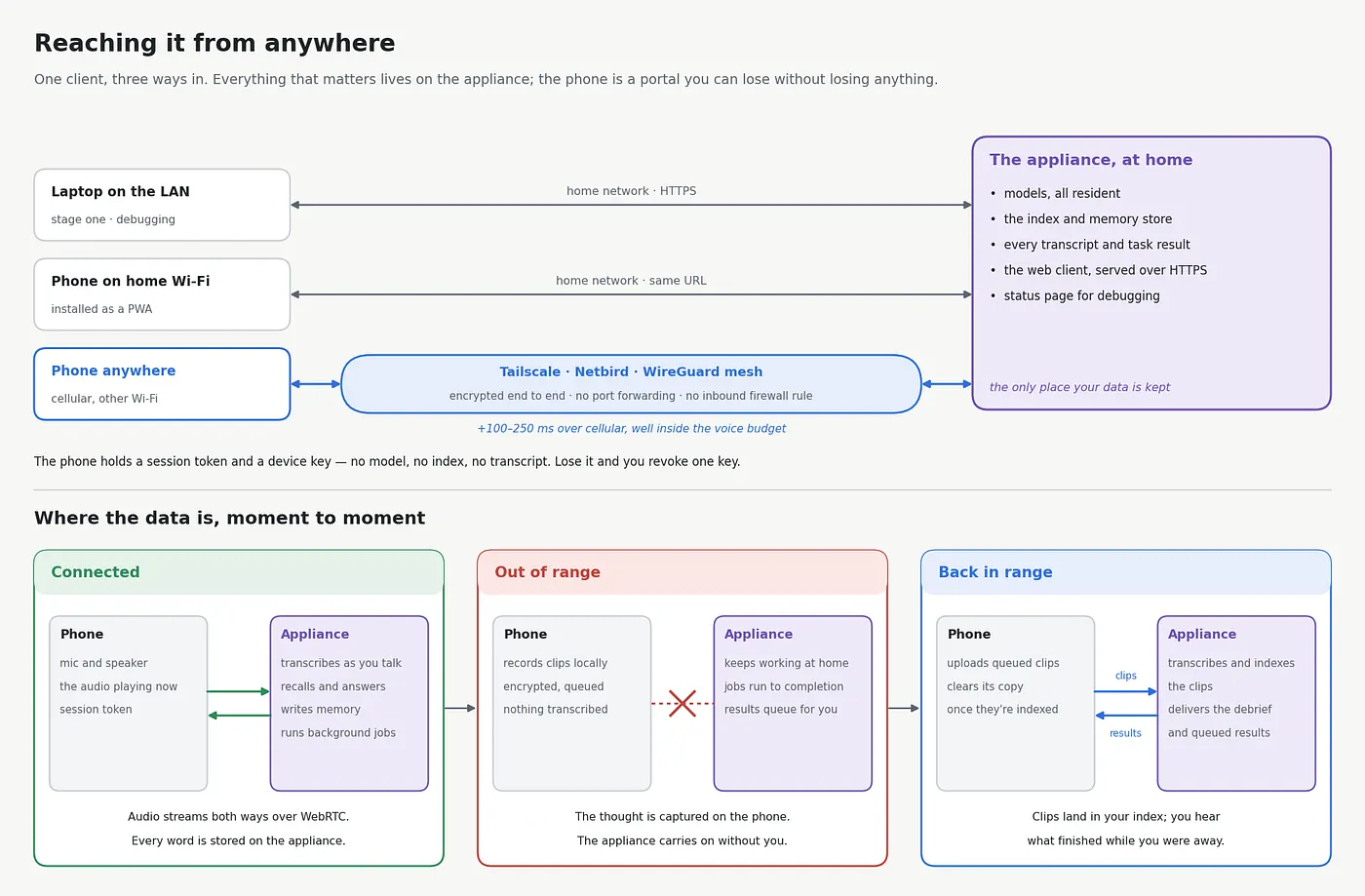
Stage one: a URL on your own network. Serve the client over HTTPS from the appliance and browse to it from your laptop on the LAN. This is the first thing to stand up, long before any VPN, because it is also your debugging surface: a page showing service health, the model roster, recent turns, retrieval hits and their scores, tool invocations, and current engagement state. When something is slow or a tool misbehaves, this is where you look. Build it first, as a plain text interface, and it earns its keep immediately.
Stage two: the phone, on your own network. Open the same URL on your phone while you are on home Wi-Fi and tap Add to Home Screen. It installs as a Progressive Web App — its own icon, full-screen launch, no app store, no review queue, no analytics SDK. WebRTC is native in mobile Safari and Chrome, so you get echo cancellation and jitter handling for free and full barge-in over the network. Plug a headset into the phone, or use the phone’s own mic and speaker; the audio hardware is always whatever you are holding.
That is already the experience the hosted assistants sell: tap the icon, start talking, interrupt mid-sentence, get an answer grounded in your own documents. The difference is where the audio goes.
Stage three: reach it from anywhere. Add a mesh — Tailscale, Netbird, or plain WireGuard — on the appliance and on your phone, and the same client works identically on cellular and on someone else’s Wi-Fi. No port forwarding, no dynamic DNS, no inbound firewall rule, and every packet encrypted end to end between two devices you own. Expect 100–250 ms of added latency over cellular, which the budget in §4 absorbs comfortably. Nothing about the client changes; only the address it reaches.
Keep the client thin. It is a portal, not a second brain — no model, no index, no transcript lives on it. Lose the phone and you have lost a session token; revoke its key and you are done.
Add offline capture. When the appliance is unreachable, the client records locally, then transcribes and indexes on reconnect. That covers the idea-in-the-car case: open the app, talk for ninety seconds, close it, and the thought lands in your index as soon as you are back in range.
On hands-free in a car: the mesh session over cellular is all you need, because Bluetooth hands-free is a property of your phone rather than of the phone network. Every connection rides a device-bound key — one client, one appliance, revocable from either end — which is the right foundation for convenience when your index holds a distilled picture of everything you work on.
10. What it costs
The box is the big line. The Beelink GTR9 Pro with 128 GB and 2 TB lists at $4,349 on Beelink’s store (list $4,799) as of September 2026. That buys the 96 GB GPU pool, a cooler that stays quiet under constant load, dual 10 GbE and enough storage for the models, the index and years of transcripts, all in one sealed, ready-to-run box. If you would rather have a machine you can open, repair and upgrade, the Framework Desktop puts the same chip in a DIY case and lists its 128 GB configuration at $3,449 before storage. Both have climbed through 2026 as memory got scarcer — Framework raised its 128 GB Desktop by $460 in January — and any Strix Halo box with 128 GB runs this build, so compare the listings and take the best deal that works for you.
Add a UPS: about $275 for a 1,500 VA unit like the CyberPower CP1500PFCLCD, and often less. It is the cheapest insurance in the build. An appliance that never turns off will eventually meet a brownout or a brief power loss of up to 30 minutes, and a clean shutdown will keep the database healthy and free from corruption.
Everything else runs on free tiers and open source. The models are open weights, and every framework, MCP server and the client itself are open source. Tailscale’s Personal plan covers up to six users and unlimited devices at no cost, ntfy or a Matrix server for notifications are free to self-host, and the backup tooling is open source too — add a USB drive to hold the snapshots. All in, the appliance comes to about $4,600 at September 2026 prices; follow the links for today’s.
You probably own the audio hardware already. On the phone, any earbuds with a mic will do, and they put the microphone closer to your mouth than the phone does. At your desk, a PC headset on the laptop does the same job. The phone’s own mic and speaker work too, since the client cancels echo at the source.
Running it costs about $5 a month in electricity. It draws roughly 15–25 W idle and 100–130 W while it is thinking; twenty idle hours and four busy ones a day come to under 0.9 kWh, priced here at the U.S. average residential rate of 18.3¢/kWh for June 2026. A smart plug will show you your own numbers. Over three years that is roughly $170.
The real investment is time — call it 40 to 80 hours to build, and a couple of hours a month keeping it current. Every one of those hours teaches you something about inference, retrieval, real-time audio or agent security that transfers directly to whatever you build next. If you are the kind of person who reads a guide like this for fun, that time is not a cost line; it is most of the point.
And the arithmetic on the other side is worth seeing clearly. The personal agents now arriving in the consumer space all follow the same pattern. Meta Muse is free to start and $20 or $100 a month for heavier use. Gemini Spark comes with Google AI Pro at $20 a month, or Ultra at $100–$200. Instinct is free during its beta, with ads based on your emails, texts and financial records among the business models floated for later. General assistants like ChatGPT Plus and Claude Pro sit at $20 a month too. Two $20 plans come to $1,440 over three years, and a $100 tier to $3,600 — for capability you rent, on terms that can change, with your inbox, calendar and payments in the hands of whoever sets those terms. This build costs about what three years of a top tier does and leaves you owning the whole stack. The weights do not expire, the index compounds, and nobody reprices it.
11. The build checklist
Six steps, in this order: memory before voice, voice before agency. Each one leaves you with an assistant you can actually use.
- Make it an appliance. Install Linux, give the GPU its ~96 GB, get the fast tier running on it, and write down your generation and prefill rates. Put every service under supervision, keep the models loaded, and serve the web client over HTTPS so you can reach it from a laptop on your LAN. You now have a private assistant at a URL on your own network, with a status page that shows what it is doing.
- Give it memory. Stand up the vector store with a pinned embedding model, build hybrid retrieval with the reranker and a distance gate, and point the indexer at your notes, repositories and meeting transcripts. Add commands to inspect and delete anything it stores. It remembers yesterday, cites where it learned things, and forgets on command.
- Give it a voice. Add the WebRTC media server, streaming speech in and out, the barge-in chain, addressee detection and verbal masking. You now have the thing you set out to build.
- Give it hands, inside a boundary. Stand up the MCP hub with three tools, write the four rules into the authorization layer, give the agent its own browser profile and accounts, and put the box on its own VLAN. It does things, and everything it can reach fits on one page.
- Take it everywhere. Install the client on your phone’s home screen, add the mesh, and set up offline capture, notifications and encrypted backups. You should be able to confidently blow it away and rebuild it in an hour. An appliance that looks after itself, with the same interface on every device.
- Hand it real work. This is the step that turns an assistant into a colleague. Run OpenCode in its own sandboxed container, reachable from the conversation as dispatch, status and cancel tools, with a watchdog outside it that stops stalls and loops and steps aside when you talk. Results land in memory and come back as a debrief or a notification. You now have something you can hand a ten-minute job and walk away from — the whole vision, running on a box you own.
12. What you’ve built
Step back and look at what is sitting on the shelf. A small box you talk to from anywhere, that answers in under a second and lets you interrupt it mid-sentence like a person. It remembers what you have worked on for months and tells you where it learned each thing. It reads your notes, repositories and meeting transcripts, reaches into your tools and web apps, and takes on jobs that run for minutes while you get on with your day — then tells you how they went.
And it does all of that inside lines you drew. Everything it knows lives in one file on your disk, and your audio, transcripts and documents leave the box only when you send them. What it reads is information, never instructions. It reads freely, and anything that sends, posts, deletes or buys waits for your yes on the device in your hand. It acts through its own accounts, on sites you have allowed, from its own corner of the network. Long jobs run in a sandbox with a watchdog that steps in the moment they stall or loop, and your voice always comes first. You can destroy it and rebuild it in an hour and recover all your context like it never left.
A few checks are worth running once, just to see it for yourself: talk over it mid-sentence, plant a trap in a web page and watch it read the page without obeying it, and capture a session’s network traffic to confirm your data stayed home. Passing them lets you say something about this machine that no subscription can say about theirs — you know exactly what it does, because you built the boundaries it works within.
Component shopping list
Everything named above, in one place to research.
Hardware · Ryzen AI Max+ 395 (Strix Halo) 128 GB — GMKtec EVO-X2, Beelink GTR9 Pro, MINISFORUM MS-S1 Max · alternates: ASUS Ascent GX10 or NVIDIA DGX Spark (GB10), Mac Studio M5 Max 128 GB · headset with hardware sidetone · small UPS · USB drive for backups · smart plug for measuring power
Platform · Ubuntu 24.04+ · Mesa RADV (kisak PPA) · Podman or Docker, rootless · systemd user units · a git repository for configuration · restic for encrypted backups
Inference · llama.cpp or Ollama on the Vulkan/RADV backend · AMD Lemonade for NPU prefill offload · LM Studio for comparing models before you commit · MLX on Apple silicon · TensorRT-LLM, SGLang or vLLM on GB10
Models · fast tier: Qwen3.6–35B-A3B · escalation: Qwen3.8–27B (Apache 2.0) or gpt-oss-120b · speech-to-text: Parakeet TDT 0.6B v3, Nemotron 3.5 ASR Streaming, or Whisper large-v3-turbo · text-to-speech: Kokoro-82M or Piper · VAD: Silero VAD v5 (ONNX) · embedding: Qwen3-Embedding-0.6B, EmbeddingGemma-300M, or bge-m3 · reranker: Qwen3-Reranker-0.6B · optional tool-call specialist: Hermes 4 14B
Voice pipeline · LiveKit Agents or Pipecat · ONNX Runtime for the VAD · WebRTC in the client
Memory · LanceDB, or SQLite metadata with an HNSW index · Qdrant for rich metadata filtering · a file watcher for incremental indexing · WhisperX for speaker separation in meetings
Tools · Model Context Protocol SDK · ready-made MCP servers for filesystem, databases, git and your apps · Goose as a desk-side text client · a browser extension bridging a profile to the MCP hub · MCP-B polyfill for WebMCP · optional MCP proxy for tool-call gating
Autonomous work · OpenCode or Hermes Agent, containerized
Network · Tailscale, Netbird, or plain WireGuard · a VLAN with egress rules · self-hosted ntfy or a Matrix homeserver for notifications
What you end up with: an assistant a little slower at trivia than the hosted ones, considerably better at knowing what you have been working on for the last eight months, and answerable only to you. Nothing leaks and nobody is listening in; when you do want to publish your work, share a result or send out your schedule, it goes where you say, the way you say. The models are yours, the index is a file on your disk, nothing you depend on can be repriced or retired out from under you, and the microphone listens only in a session you started with a tap in the app — one more tap and it is silent. Rebuild it in an hour and recovery your backup context with no stress and you have a permanent, reliable, sovereign AI assistant for life.